Every step of a player's development, measured against their age group.
Fitness tests with norms for every age category, biological maturity, season assessments, scouting and reports for parents. One place for player development in your academy and club.
A demo without registration: a sample academy with 55 players, reset to its starting state every night.
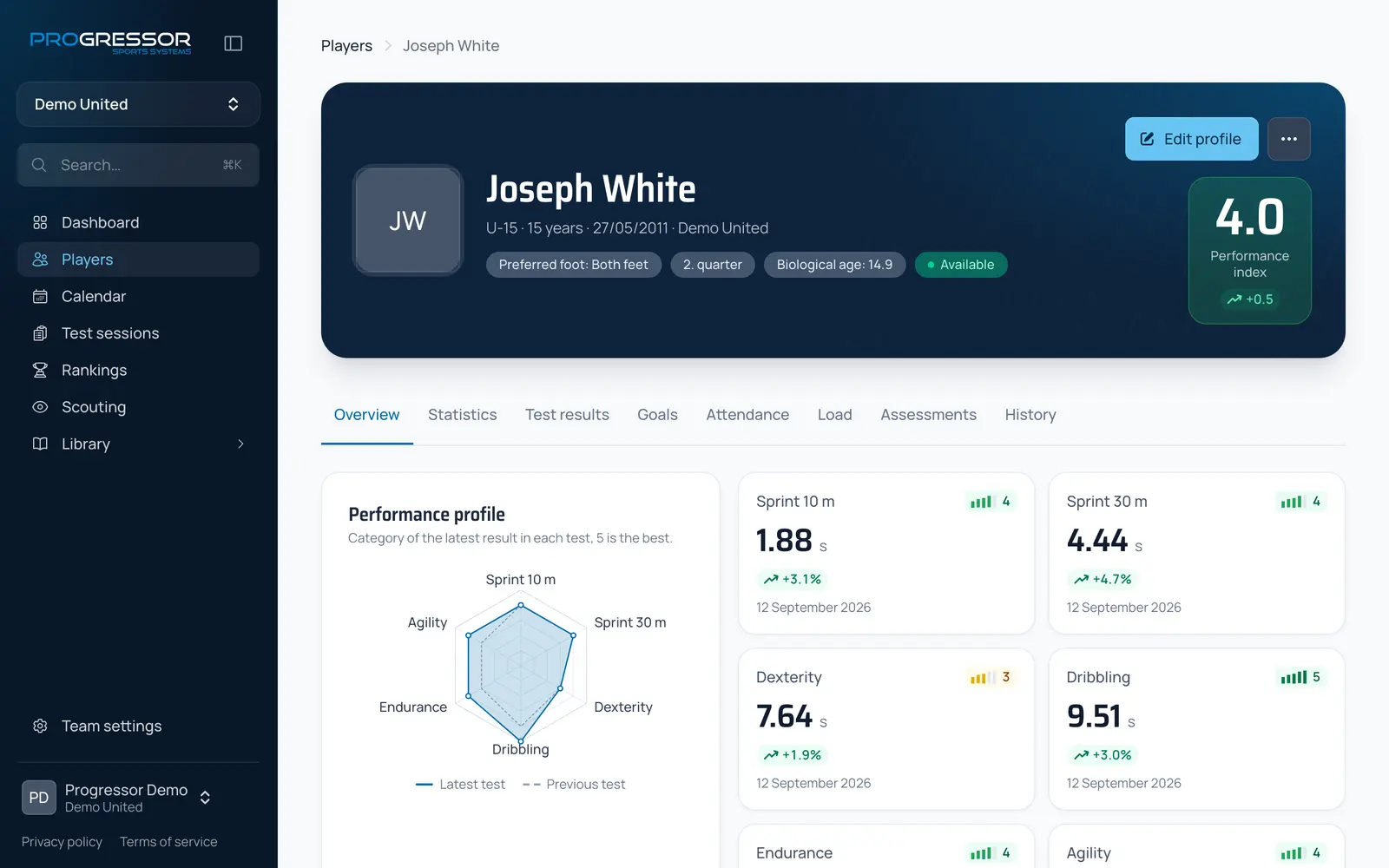
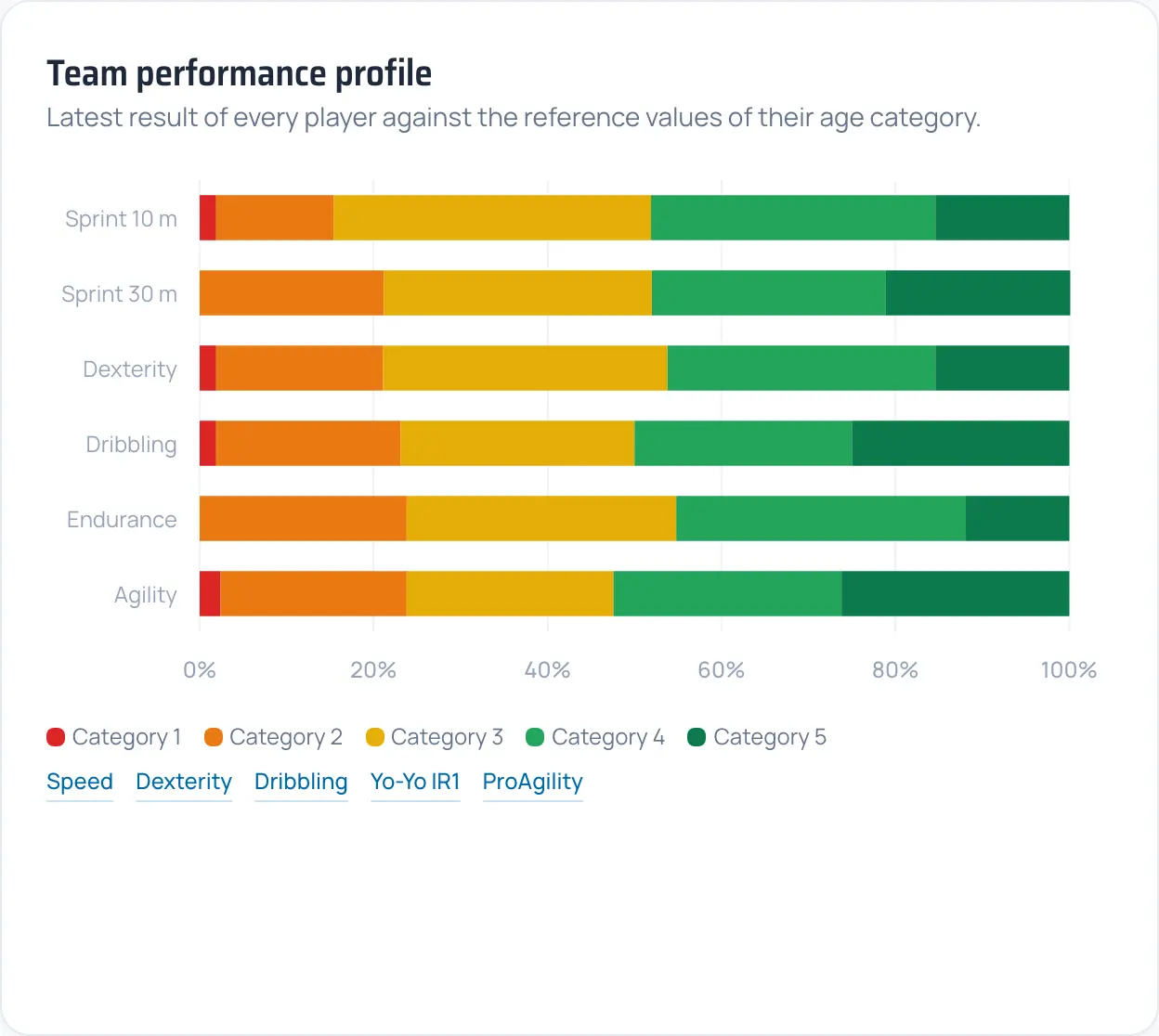
Every result gets a category from 1 to 5 against the reference values of the player's age category.
- 1 Insufficient
- 2 Weak
- 3 Satisfactory
- 4 Good
- 5 Excellent
Recognised methods, not guesswork.
- Mirwald et al. (2002)
- Biological age and the distance from PHV from three measurements, for players aged 8–18.
- Cumming et al. (2017)
- Bio-banding: groups by the percentage of predicted adult height.
- WHO 2007
- BMI assessed for age and sex rather than against adult thresholds.
- Yo-Yo IR1
- Distance and estimated VO₂max from the level and shuttle at which the player stopped.
Same age group. Different biological clock.
In an under-13 team, the biological ages of the players can be several years apart. Those who mature early are faster and stronger today, so they play more. Late-maturing talent drops out before catching up with their peers.
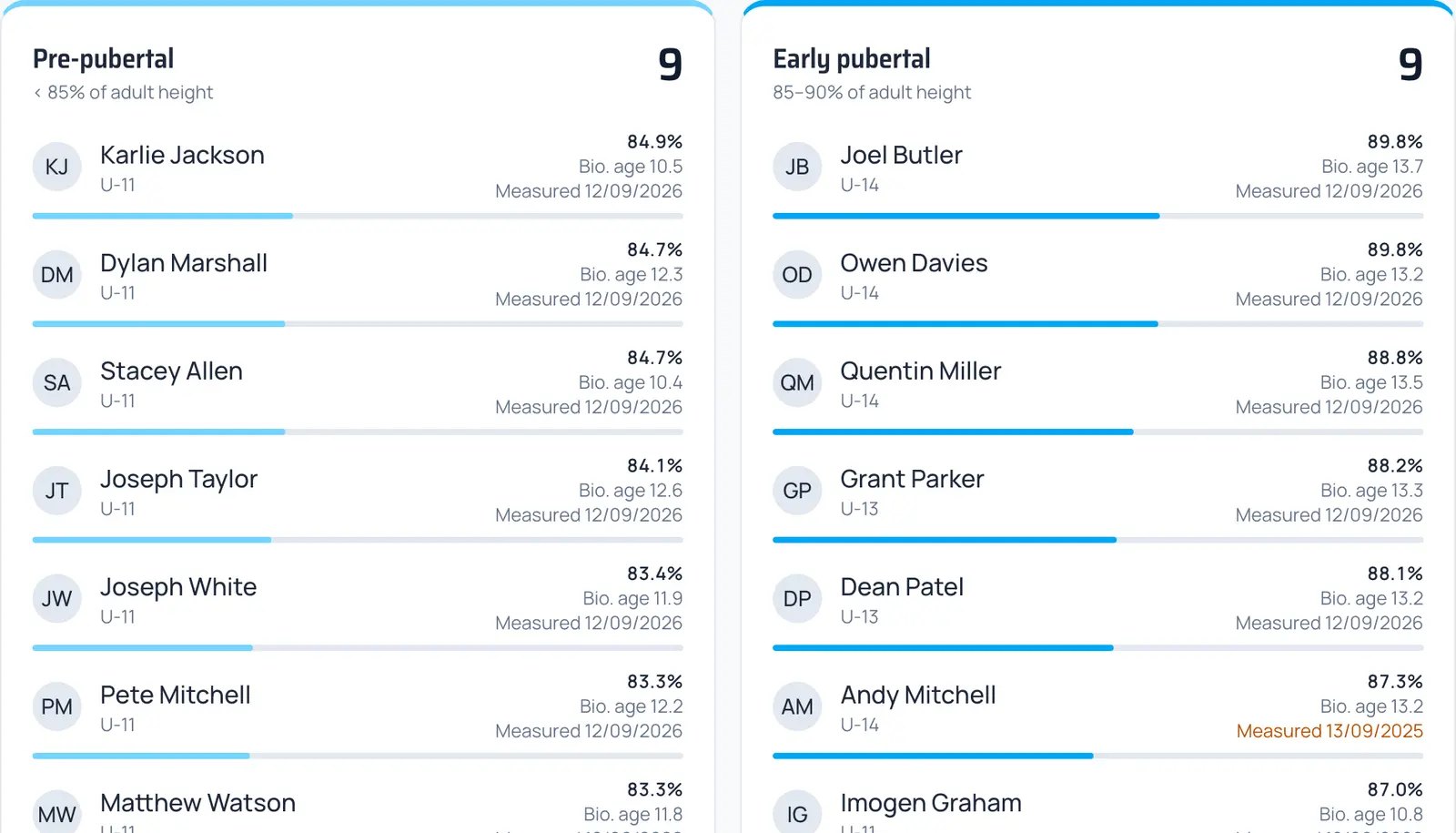
From three measurements, height, sitting height and body mass, Progressor estimates biological age, the distance from peak height velocity (PHV) and predicted adult height.
- Growth spurt. Players around PHV are flagged, because that is when the risk of overload rises.
- Bio-banding. Small-sided game groups by maturity rather than date of birth.
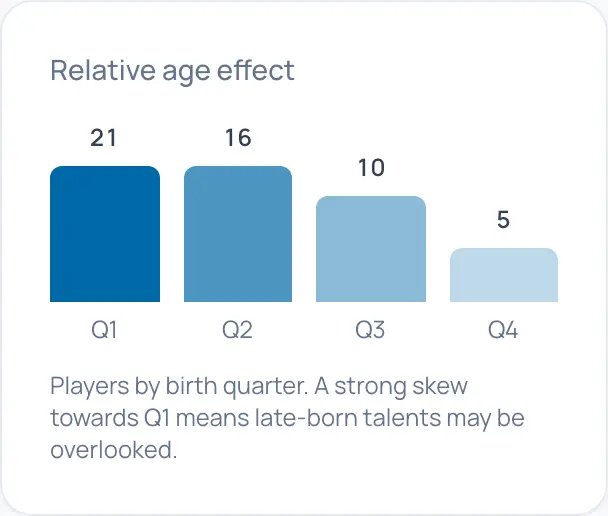
- Relative age effect. The spread of birth quarters shows whether you are overlooking the younger players in the age group.
Jack
Aged 13, born in 2013
Early maturing
Oliver
Aged 13, born in 2013
Late maturing
- Biological age
- 14.6
- Sprint 10 m
- 1.86 s category 5
- Biological age
- 11.9
- Sprint 10 m
- 2.09 s category 2
Sound familiar?
-
Today
Test results sit in coaches' spreadsheets, and each one calculates them differently.
With Progressor
One results database for every age group, with the same norms and charts.
-
Today
Parents ask how their child is developing and get vague answers.
With Progressor
A development report as a PDF or a link you send to the guardians.
-
Today
Scouts' notes get lost in notebooks and messages.
With Progressor
Match reports and a prospects board for the whole staff.
From test day to the talk with parents.
The staff enter data once, and Progressor turns it into categories, charts, rankings and reports. For every age group, by the same rules.
Enter results by the pitch, not at your desk in the evening.
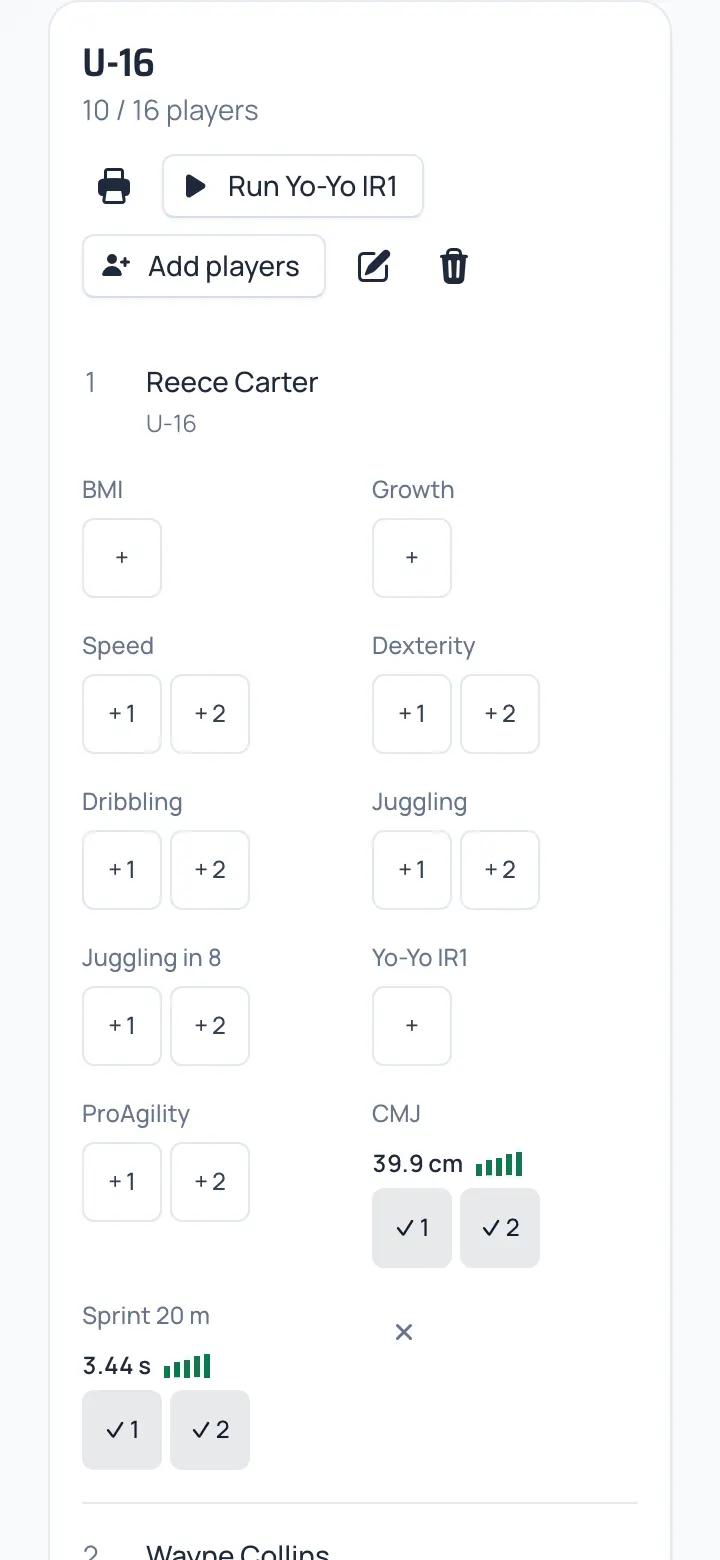
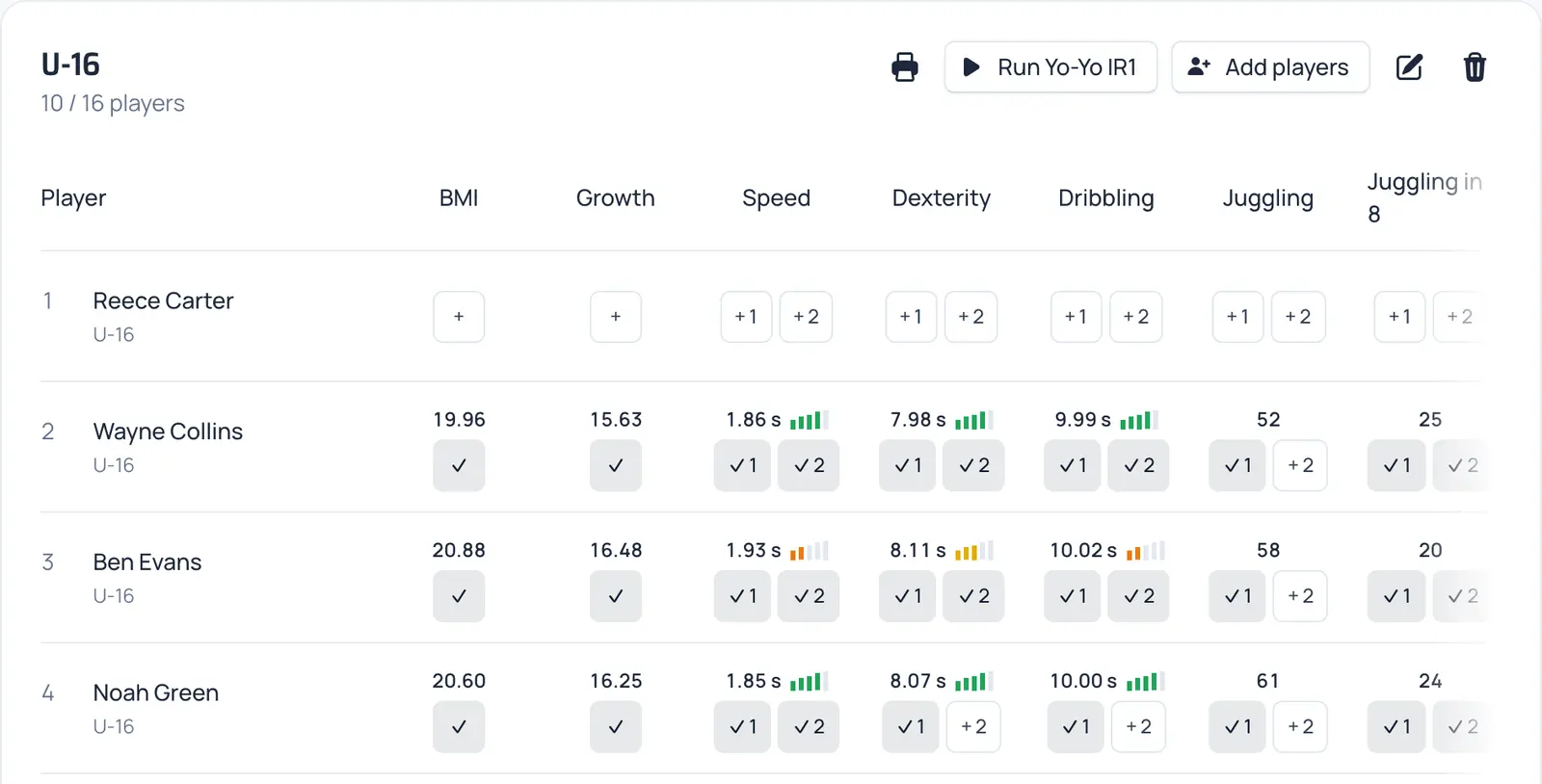
Split the players into groups, pick the tests and enter results on a phone or tablet. The category shows as soon as you save, and a progress bar shows how many results are still missing.
- Two attempts in speed and coordination tests. The better one counts.
- Nine tests built in, including Yo-Yo IR1 and ProAgility, plus club tests with your own norms.
- Printable group lists for when you prefer a clipboard.
Every result instantly measured against the age group norm.
1.90 s over 10 m is category 3 at under-15. Progressor compares every result with the reference values of the age category and shows the target: from 1.88 s the player reaches category 4.
- Norms for the age categories in Poland and Germany.
- Performance index for players and teams, rankings and comparisons of up to four players.
- A new season on 1 July: age categories move up on their own.
Sprint 10 m, U-15
1.90 s
category 3
Target for the next test
1.88 s category 4
Parents get a report, not vague answers.
One page: fitness profile, latest results with categories, maturity and development goals. Download the PDF for a parents' meeting or send the guardians a link valid for 30 days.
- Up to four guardian addresses per player, each with its own link.
- Guardians confirm their address first and unsubscribe with one click.
- A reminder the day before training, a match and a test session.

Development report: Gustaw Mazur
Demo KS via Progressor
Demo KS has shared the development report of Gustaw Mazur with you. The link is valid until 30 October 2026.
Open the reportScouting from the match report to a trial at your club.
Rate opposition players against your own criteria and follow them over the following matches. The prospects board takes each one from the first observation to a decision: watched, shortlist, on trial, signed.
A player invited for a trial gets a profile and results like everyone at the club, and you print the match report for the director as a PDF.
More about scouting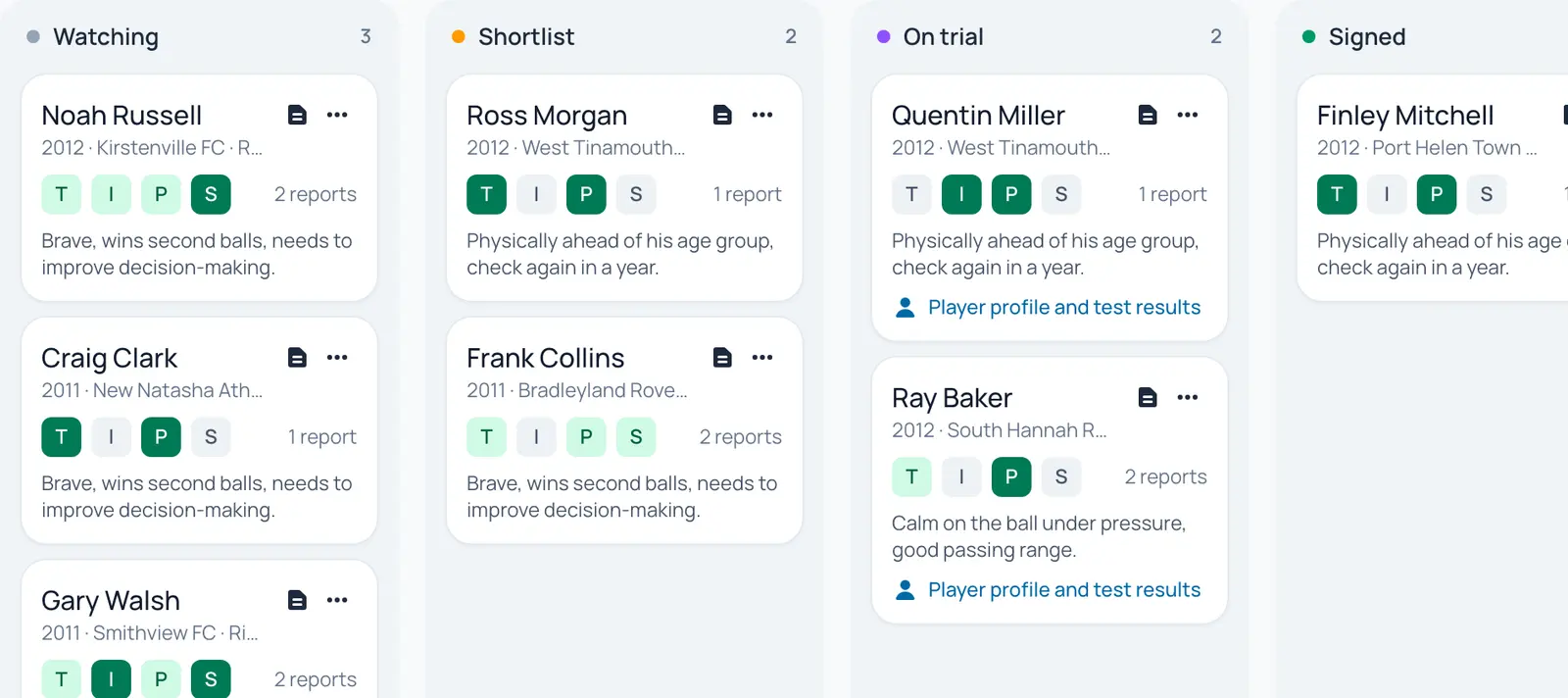
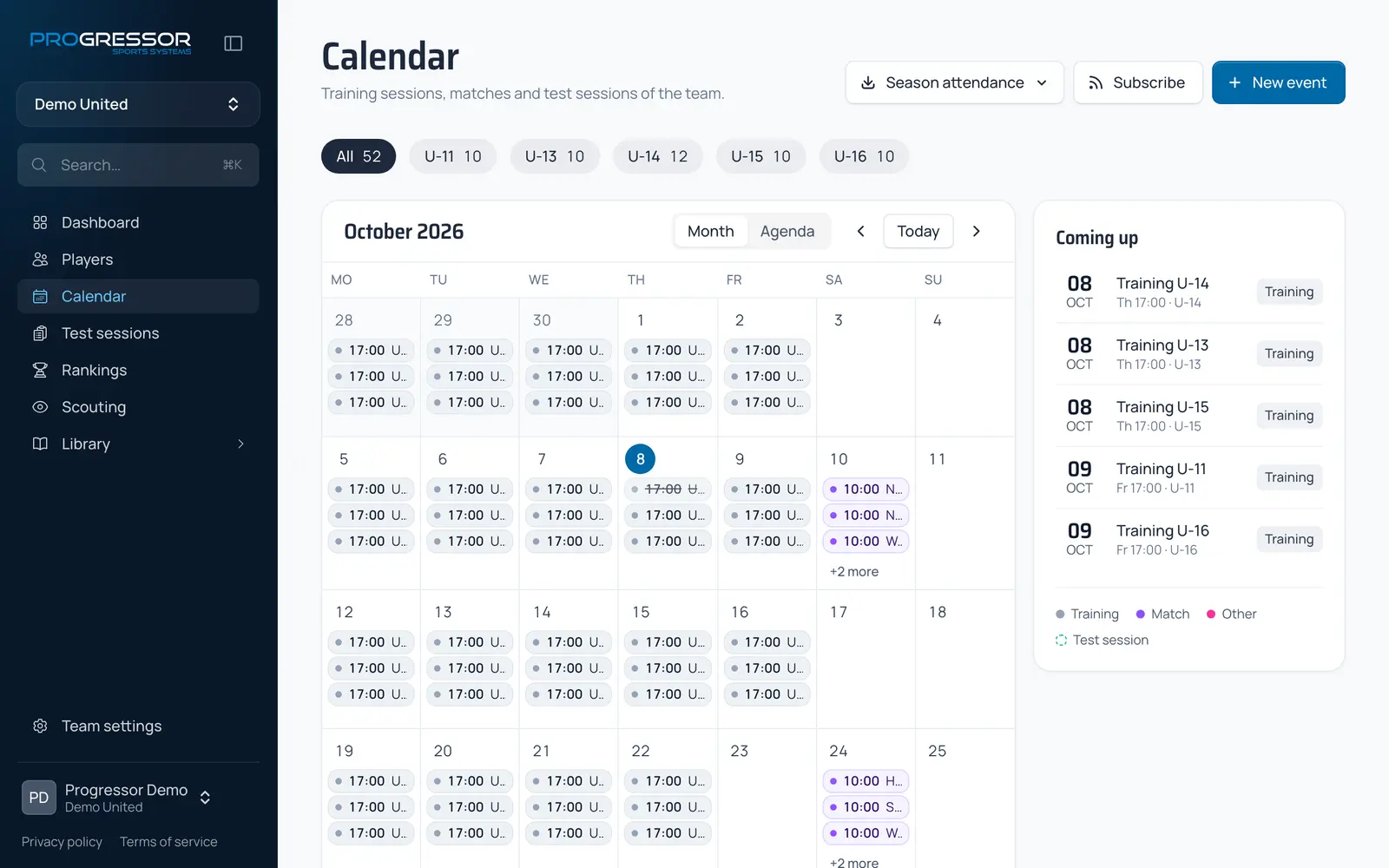
Training, matches and test days in one calendar.
Attendance with reasons for absence, match results, minutes, goals and assists. Subscribe to the team calendar on your phone, and the dashboard reminds you of missing registers.
- Player and team attendance over the last 30 days.
- Injuries with return-to-play stages and medical check-up dates.
- Subscriptions in Google Calendar, Apple Calendar and Outlook.
And also
- Season assessments with your own criteria and questions
- Player development goals
- PDF printouts of sessions, groups, assessments and scouting reports
- Team roles: owner, administrator, editor and analyst
- Comparisons of results for up to four players
- English, Polish and German for every user
Get started in three steps.
-
We set up your academy's account
The region, Poland or Germany, sets the age categories and norms. You invite your coaches and give them roles.
-
You plan your first test day
Add players, pick built-in or your own tests and split the team into groups.
-
You enter results, Progressor does the maths
Categories, charts, biological age and reports for parents are ready as soon as you save.
For the whole academy staff.
Academy director
One standard for tests and reports across every age group.
- Team performance index and season trends
- Development reports for parents
- Team roles and a data processing agreement
Team coach
Less paperwork, more time on the pitch.
- Results from your phone by the pitch
- Attendance and match results
- The team calendar on your phone
Strength and conditioning coach
Training load matched to maturity.
- PHV, biological age and bio-banding
- Targets for the next category
- Club tests with your own norms
Scout
Observations that do not get lost in a notebook.
- Match reports with criteria
- A prospects board
- Test results of players on trial
Player data in the EU, under the club's control.
You work with children's data, including health data. That is why the club stays the data controller, and we process the data under a data processing agreement.
- Servers in Germany
- Hosting and backups with Hetzner Online. The data never leaves the European Economic Area.
- Data processing agreement
- An Article 28 GDPR agreement for every club, with a list of sub-processors.
- Team roles
- Owner, administrator, editor and analyst. Each team sees only its own data.
- Two-factor login
- Authenticator app codes and passkeys. Mandatory for service administrators.
- Encrypted backups
- Daily and hourly, encrypted with AES-256 and also stored off the server.
- Guardian consent
- Addresses confirmed by guardians, and report links that expire and can be revoked.
- Photos without metadata
- We keep a smaller copy without GPS location and delete the original straight away.
- No ads, no tracking
- Essential cookies only. We do not sell data or use it for advertising.
Pay for the academy, not for coach accounts.
The price depends on the number of players. Invite as many staff as you like, and every plan includes all features. In the 2026/27 season the first clubs get a pilot price.
-
Team
Up to 40 players. For the coach of one team.
Pilot price in your quote
-
Academy
41–250 players. For academies with several age groups.
Pilot price in your quote
-
Club
Over 250 players. For large clubs or several locations.
Individual quote
- All features Unlimited staff Help getting started
The questions we hear most often.
Is your question not here? Write to us: sales@progressor.systems
Can I try Progressor without registering?
Yes. The Try the demo button logs you in to a sample academy with 55 players, test sessions, a calendar and scouting. Others use the demo too, and the data is reset every night, so do not enter real data there.
How do we get an account for our club?
Registration is by invitation. Write to us, and we will set up your academy's account and help you invite your staff.
Who is the controller of the players' data?
The club. We process the data on its behalf under a data processing agreement (Article 28 GDPR). The servers are in Germany, and the data never leaves the European Economic Area.
Which tests are built in?
BMI, maturity, 10 and 30 m sprints, dexterity, dribbling, juggling, juggling in 8, Yo-Yo IR1 and ProAgility. Add your own tests, such as CMJ or a 20 m sprint, with your own norms.
Do the norms cover girls?
For now, girls' results are compared with the boys' norms, and the profile and reports say so clearly. Biological age uses a separate equation for girls.
Does Progressor work on a phone?
Yes, in the browser, with nothing to install. Results entry is designed for phones and tablets. All you need is an internet connection, mobile data will do.
Which languages does Progressor support?
English, Polish and German. Each user picks their own language, and the team's region sets the age categories and norms.
What happens to our data if we leave?
On request we will hand over a copy of your data in electronic form. A deleted team is permanently erased after 30 days, and the data disappears from backups as they rotate.
See your academy in Progressor.
Open the demo and try everything with a sample academy's data. When you want to start with your own players, request access.
What happens after you request access
-
We reply within one working day.
-
We talk for 20 minutes about your academy and the tests you already run.
-
We set up your account and help you prepare your first test day.